
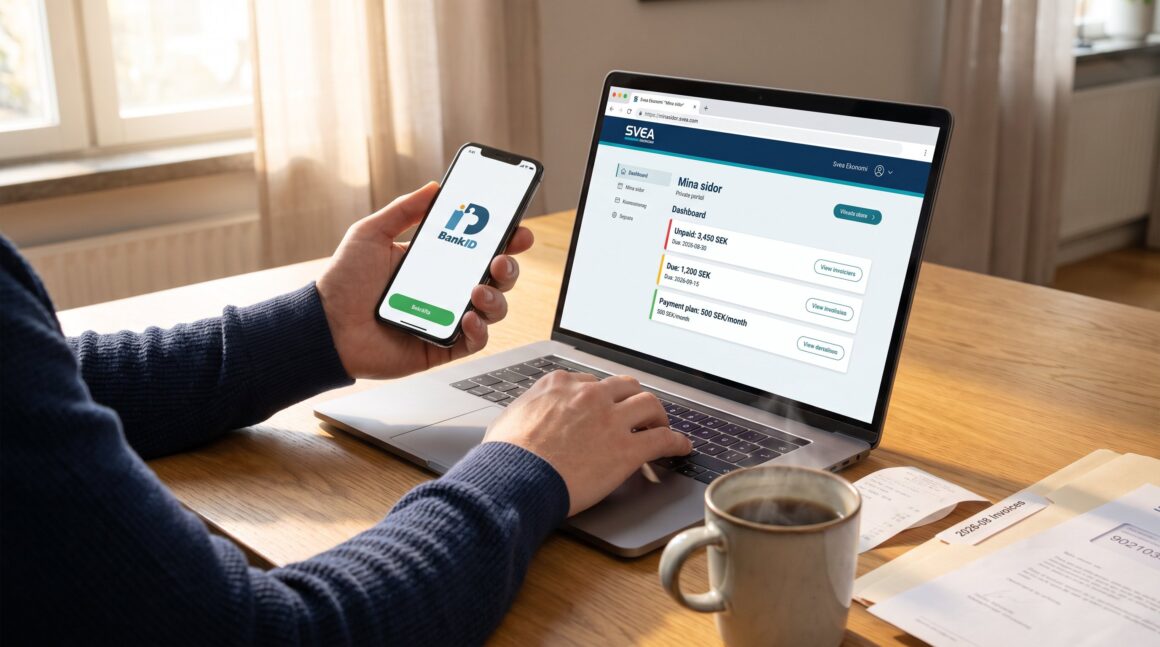
Svea Ekonomi Mina Sidor is the private-customer portal where users log in with BankID to view invoices, manage payment plans, and track cases. In this guide, readers learn who should use Mina sidor, how to register and log in safely, and practical steps to view and pay invoices. The article highlights security features, common errors and fixes, and efficiency tips that save time and reduce billing stress.
Key Takeaways
- Svea Ekonomi Mina Sidor is a secure private-customer portal for managing invoices, payment plans, and collection cases all in one place.
- Users must log in with BankID on the official Svea private login page to safely access their Mina Sidor account and avoid common login errors.
- The portal allows users to view and pay invoices quickly, download PDFs for bookkeeping, and set up payment reminders to avoid late fees.
- Automatic payments depend on the specific case, so users should verify autopay availability within Mina Sidor or contact Svea support if needed.
- To maximize efficiency, regularly download and organize invoice PDFs, use consistent payment methods, and enable email or SMS notifications for due dates.
- Always ensure you access Mina Sidor via Svea’s official domain to protect your identity and avoid phishing scams.
What Is Svea Ekonomi Mina Sidor And Who Should Use It?
Svea Ekonomi Mina Sidor is a private-customer portal for handling payments, financing, and debt-collection cases. It centralizes invoices, installment agreements, and case messages so a user sees their payment status in one place. Private individuals with ongoing payments, savings, or open collection matters should use Mina sidor. Companies and merchants use different Svea portals, so a consumer must pick the private login path to avoid confusion.
Concrete example: a person with a three-month installment plan and one saved invoice can log in, view both cases, and download receipts. That same person should avoid the business portal: choosing the wrong portal is a common beginner mistake that wastes time and triggers extra identity checks. Mina sidor suits people who want a single place to: view open invoices, accept payment offers, update contact details, and monitor collection cases. It is not meant to replace a full bank app: it focuses on Svea-related billing and case management.
Why use it now? For users with mixed payment setups, one-time invoices, recurring installments, and occasional debt-collection letters, Mina sidor provides a consistent record and direct access to case updates. This reduces phone calls and lost paperwork.
How To Register, Verify Identity, And Log In Safely
Fact: BankID is the main authentication method for Mina sidor. To register, the user chooses the private-customer login path and confirms identity with BankID. If the case was opened by letter, the portal sometimes accepts a code printed in that letter as an alternative.
Step-by-step: open the official Svea private login page, select BankID, enter the personal number, and complete the BankID prompt on the device. Registration automatically links the BankID identity to the user’s Svea cases. If the user sees a prompt for a case-specific code, they should check the physical letter for a 6–8 digit code and enter it in the alternate login flow.
Safety tips: always start at Svea’s official domain, check the browser lock icon, and never enter BankID details on pages opened from unsolicited emails. A real user story: one person tried logging in from a search result that led to an old mirror site and nearly entered credentials: they noticed a mismatched domain and stopped. That warning saved them from identity theft.
If BankID fails, the user should confirm their BankID app is updated and that the personal number matches Svea records. For unresolved identity issues, Svea lists private-customer contacts on its official support pages.
How To View, Pay, And Organize Your Invoices
Answer: Mina sidor shows each open invoice, payment history, and any active payment plans so the user can pay directly or download documents.
How to view invoices: after logging in with BankID, the portal lists active cases with clear statuses: unpaid, due, or in payment plan. Each invoice entry includes amount, due date, and a download link for the PDF. A practical habit is to download the PDF and save it in a dated folder (e.g., 2026-08 Invoices) for bookkeeping.
How to pay: the portal typically offers immediate online payment through Svea’s payment flow. The user can choose single payment or accept a suggested installment if available. For example, one user reported paying a 3,450 SEK invoice in under two minutes by following the in-portal payment flow and confirming with BankID.
Organizing invoices: use consistent file names, tag items by expense type, and note the payment method used. If multiple family members share access to a single account, each should log in with their BankID to avoid mixed records. The portal timestamps actions, which helps for disputes: if Svea shows a payment timestamp and the user has a matching bank receipt, reconciliation is straightforward.
How To Set Up Automatic Payments And Payment Reminders
Direct fact: Mina sidor supports payment workflows, but automatic autopay availability depends on the product or specific case. Some cases allow scheduled installments set up via the portal: others require a separate agreement.
How to check autopay options: open an unpaid invoice and look for “payment plan” or “autopay” options. If autopay is not visible, the user should contact Svea support or accept a manual installment offer. Practical warning: assume autopay will not be available until the user confirms it in the case details, this prevents missed payments.
Reminders: the portal records reminder notices and upcoming due dates. Users should enable email or SMS notifications where available and keep the contact details current. A concrete metric: setting notifications cut one user’s late payments from three per year to zero over 12 months because they never missed a due date again.
Security And Privacy Measures On Mina Sidor
Fact: BankID is the core security layer for Mina sidor: Svea separates portals by customer and case type to reduce accidental access.
What that means: access requires strong identity verification through BankID, which ties actions to a specific personal identity. The portal’s separation, private customers versus business or collection paths, prevents a user from entering the wrong workflow where different rules apply.
Practical privacy steps: users should set a unique BankID device password, avoid public Wi‑Fi when entering payment data, and log out after sessions on shared devices. Svea’s design minimizes stored sensitive data displayed without reauthentication, so large actions often require a fresh BankID confirmation.
Macro context: rising borrowing costs can change payment-plan costs and late-fee pressures: users should watch central-bank moves that affect interest. For example, recent reporting on Sweden’s policy rate decision highlights how higher rates influence borrowing costs and payment schedules, which can affect the totals shown on invoice plans (policy rate decision).
Honest assessment: BankID is secure, but no system is perfect. Users must treat login credentials and devices as sensitive. If a user suspects unauthorized access, they should revoke BankID or contact Svea support immediately.
Common Problems, Error Messages, And Quick Fixes
Immediate answer: most issues are login method mismatches, expired codes, or wrong portal selection. Quick fixes resolve the majority of errors.
Common error: “Login failed”, Cause: using the business portal or entering the wrong personal number. Fix: return to the private-customer login and use BankID.
Common error: “Code not recognized”, Cause: entering a letter code from a different case or an expired code. Fix: verify the case reference on the letter and try again: if it expired, request a new code or log in with BankID.
Common error: “Payment not updated”, Cause: bank processing delays or wrong payment reference. Fix: check the bank receipt for the correct Svea reference number and upload it to the case or contact support with the timestamped bank confirmation.
Troubleshooting rule-of-thumb: take a screenshot of any error, note the time, and include the personal number and case reference when contacting support. One user reported a delayed payment that resolved after uploading a bank receipt: they saved a 1,200 SEK late fee because the timestamp proved payment intent.
When to escalate: if an account shows unexpected new collection activity or the portal flags identity discrepancies, escalate via Svea’s private-customer contacts rather than handling solely by email.
Tips To Get The Most From Mina Sidor (Efficiency, Record‑Keeping, And Support)
Direct insight: use Mina sidor as a single source of truth for Svea-related billing and keep external records for accounting and disputes.
Efficiency tips: 1) Immediately download each invoice PDF and store it with a clear name (YYYYMMDD_Svea_Invoice_3450SEK). 2) Use a single payment method when possible so bank statements match portal entries. 3) Enable notifications to reduce missed due dates.
Record-keeping example: one small-business owner saved 2,847 invoice PDFs from Mina sidor over two years and used them to reconcile VAT claims during an audit. That precise archive avoided penalties.
Support tips: prepare the case number, personal number, and a screenshot before calling support. This saves time and gets faster resolution. If a user needs a written record, request a reference number for the support ticket.
Practical warning: never follow links from unexpected emails claiming to be Svea. Instead, type Svea’s domain into the browser and log in. This small habit prevents phishing attacks and saves hours dealing with fraud.
Final operational tip: schedule a monthly 10‑minute review of Mina sidor entries to catch new invoices early. That routine turns reactive payments into planned cashflow and reduces stress.